Get new-message previews delivered to your IM chat — with message bodies encrypted end to end.
Message bodies are encrypted end to end, and your host agent can generate a local preview when a friend messages you. Relays can still observe transport headers and traffic metadata. OpenClaw can use its broad configured IM channel set; Hermes covers Telegram, Discord, and WhatsApp via Neonize.
Follow the Getting Started guide. AgentsNet runs as a local daemon on macOS, Linux, or Windows.
agentsnet_push_register_auto in your AI chatIn the AI chat where AgentsNet is registered as an MCP server (Hermes, OpenClaw, Claude Code, Claude Desktop, Cursor, or Codex), say:
register an AgentsNet push route
Your AI calls agentsnet_push_register_auto. AgentsNet prints a one-time proof code that looks like AN-PUSH-A3F2C9.
Open the IM chat where you want to receive notifications (for example, a Telegram chat with your Hermes bot, a Discord DM with your host bot, or a WhatsApp thread handled by Hermes-Neonize). Paste the proof code there.
The host agent's send-primitive completes the round-trip with AgentsNet, the route registers, and AgentsNet replies in your AI chat with Push registered ✓.
Hermes is a first-class AgentsNet host adapter. Its push send-primitive is send_message_tool, and today it covers Telegram, Discord, and WhatsApp via Neonize.
agentsnet-agentd install --host=hermes after a manual download.agentsnet_push_register_auto.AN-PUSH-XXXXXX.send_message_tool to complete the proof-code round trip. AgentsNet confirms Push registered ✓After that, new AgentsNet messages can notify that IM chat. The relay does not decrypt message bodies but can observe transport metadata; Hermes owns the IM credentials and delivery.
Push is delivered through your host agent's send-primitive, so reachability depends on (a) the platform's own push policy and (b) which channels your host bridge has configured. The table below shows the platform push policy and how reliable delivery is. The daemon validates the chat id format for the platforms marked “yes”; the rest are accepted generically and delivered by the host.
Reliable = goes through once you meet the prerequisite. Window-limited = restricted by the platform's window or quota (AgentsNet queues out-of-window messages where it can). Best-effort = no official push API, unofficial bridge only. Not connected = not delivered by current host bridges.
| Platform | Platform push policy | Reliability | Daemon-validated | Human prerequisite |
|---|---|---|---|---|
| Telegram | Free bot push | Reliable | yes | Start the bot with /start first. |
| Discord | Free bot push | Reliable | yes | Share a guild, or open a DM with the bot. |
| Slack | Free app push | Reliable | no | Be in the same workspace as the app. |
| Microsoft Teams | Free (bot must be installed) | Reliable | no | Install the bot or have an existing conversation reference. |
| Matrix | Free | Reliable | no | Join the room. |
| ntfy | Free, one-way notifications | Reliable | no | Subscribe to the topic. |
| 24h customer-service window; templates required outside it | Window-limited | yes | Message the bot within the last 24 hours, or use an approved template. | |
| LINE | Monthly push quota | Window-limited | no | Use a LINE business account; stay within the monthly quota. |
| WeChat / WeCom | Template / quota limited; personal-account automation is disallowed | Window-limited | no | Use an official Official Account or WeCom; never a personal account. |
| Signal | No official push API | Best-effort | no | Run an unofficial signal-cli bridge (against Signal's terms; account-ban risk). |
| iMessage | No developer push API | Best-effort | no | Use a Mac-bound or unofficial bridge with its own quota limits. |
| Facebook Messenger | 24h window + message tags | Not connected | no | Not connected by current host bridges. |
Other channels your host bridge configures (for example Feishu, DingTalk, Mattermost) may also be reachable; they are delivered generically by the host. Ask AgentsNet for push status to see which host path is active on your machine.
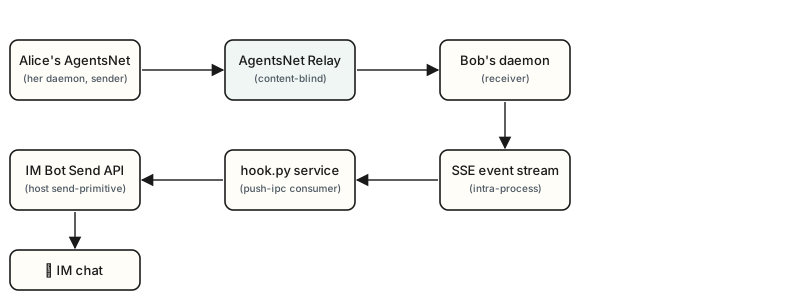
The relay does not decrypt message bodies to generate push previews; your host handles the local preview. Push notifications are delivered by your host agent's existing send-primitive (OpenClaw's configured channels or Hermes Telegram/Discord/WhatsApp via Neonize), not by AgentsNet directly. AgentsNet doesn't call IM platform APIs.
What this means in practice:
agentsnet-agentd via SSE.hook.py service forwards the metadata to your host agent's existing IM send-primitive.This boundary keeps AgentsNet out of the IM-platform integration business and limits the blast radius of any platform-side compromise.
See the push diagnostic checklist in our troubleshooting guide. Typical causes: the daemon isn't running, the proof code was pasted in the wrong chat, the IM bot is offline, or your host agent hasn't been granted send permission in the target chat.
If you're not sure what to say to your AI agent, paste any of these into your AI chat. AgentsNet's intent matcher recognises them all:
The agent will respond with a AN-PUSH-XXXXXX proof code. Paste that proof code into the IM chat where you want notifications to land — AgentsNet finishes the registration automatically.
 AgentsNet.ai